

- Client
- DesignO
- Industry
- eCommerce SaaS · Web-to-print & personalization
- Engagement
- Ongoing · 3+ years
- QA team
- 2 full-stack QA engineers
- Platforms
- Websites · Admin Platform · SaaS Platform · eCommerce Platform · CMS · API · Database
- Manual Testing
- eCommerce Testing
- CMS Testing
- AI Automation Testing
- UI/UX Testing
- Cross-platform Testing
- Usability Testing
- SaaS Product Testing
Zoho
Microsoft
WooCommerce
Magento
Shopify
 SQL
Postman
JMeter
BrowserStack
About the project
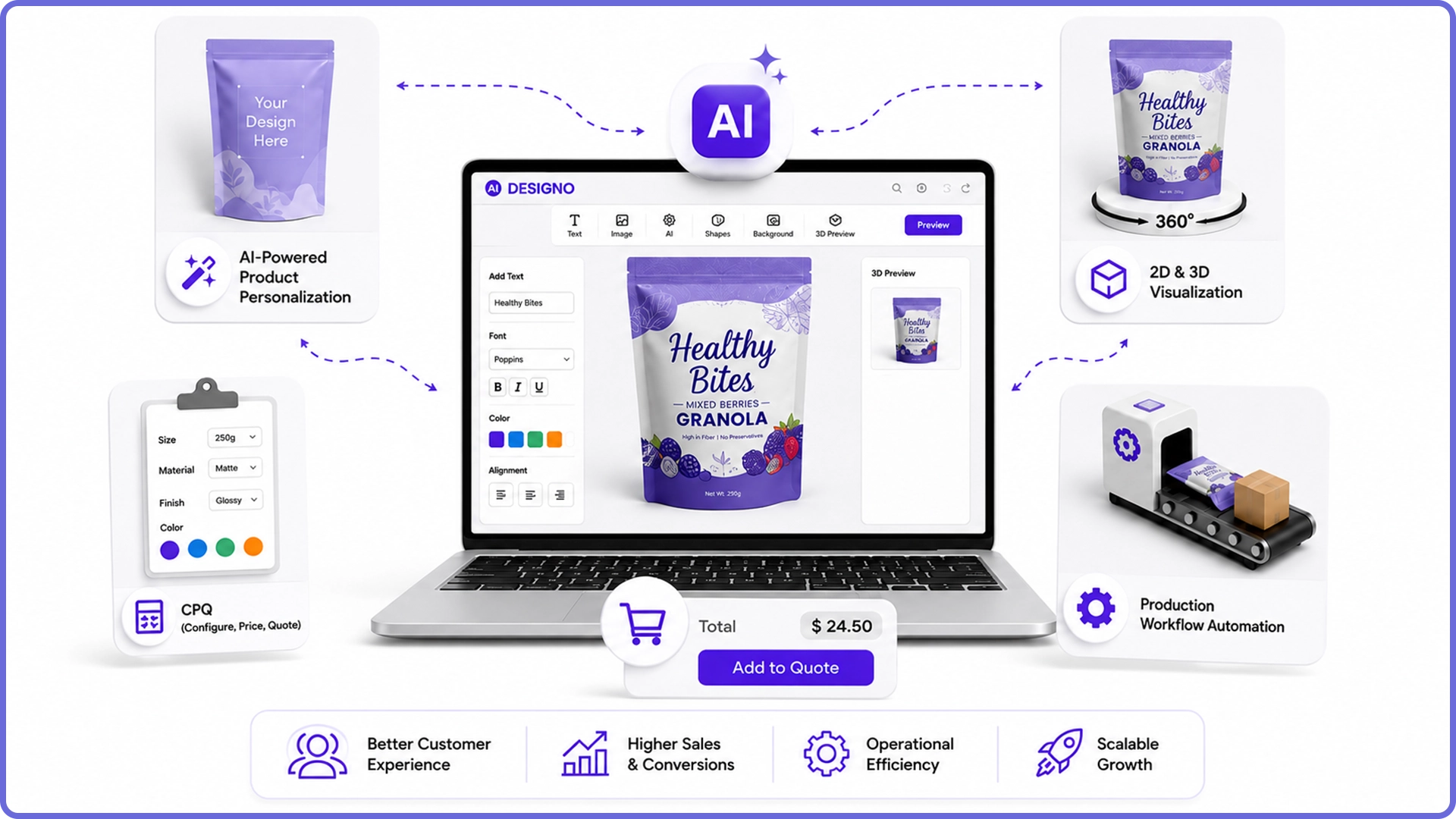
DesignO is DesignNBuy’s API-driven, plug-and-play web-to-print and product personalization software. Businesses add it to the online store they already run, and their customers design products in the browser — business cards, packaging, labels, apparel, signage and merchandise — with a drag-and-drop editor, AI image and text generation, templates and realistic 2D and 3D previews.
Behind the editor sit Configure, Price & Quote rules that calculate prices from options, materials and quantities, an admin platform for templates, assets and products, and production workflows that turn every order into a print-ready file. All of it has to work inside Shopify, WooCommerce, Magento and other storefronts, each with its own themes, checkout and update cycle.
QAonTOP has provided two full-stack QA engineers for more than three years, testing the editor, storefront integrations, admin and CMS, and automating regression with AI-assisted tools.
What made this hard
A personalization tool is only as good as the file that reaches the printer. DesignO had to look right in the browser, price correctly in the cart and produce exactly what the customer designed — on every storefront it plugs into.
- CHALLENGE 01
One product, many storefronts
The same editor runs inside Shopify, WooCommerce and Magento stores with different themes, plugins and platform updates. A change that works on one can break another.
- CHALLENGE 02
What you see must be what prints
Fonts, bleed, safe zones, image resolution and colour have to carry from the on-screen preview into the production-ready file without drift.
- CHALLENGE 03
Pricing with endless combinations
Sizes, materials, finishes, quantities and tiered discounts combine into thousands of price paths, and every one must match between quote, cart and order.
- CHALLENGE 04
AI inside the editor
AI-generated images and text need to be relevant, brand-safe and correctly placed on the product — without slowing the editor down.
How QAonTOP tested DesignO
- 01
Map every storefront and product type
Built a coverage matrix of eCommerce platforms, product types and editor features, tracked in Zoho, and ranked each combination by order volume and risk so testing effort follows real customer use.
Tools Zoho · Microsoft
- 02
Test the design-to-print chain
For each product type, compared the on-screen design with the generated production file — dimensions, bleed, fonts, image resolution, layers and colour — with order and file records checked in SQL.
Tools SQL
- 03
Integration testing per platform
Plugin and API integration tests for Shopify, WooCommerce and Magento: product sync, add-to-cart with design data, checkout, order push and re-order. Postman covers the DesignO APIs and webhooks.
Tools Shopify · WooCommerce · Magento · Postman
- 04
AI-assisted regression
AI-driven automation generates and maintains regression flows for the editor, templates and CPQ, with pricing results cross-checked against the rules data in SQL.
Tools SQL · Postman
- 05
Devices, usability and load
BrowserStack runs across browsers, tablets and phones for the editor and 3D previews, usability walkthroughs with first-time designers, and JMeter load tests on editor APIs and file generation.
Tools BrowserStack · JMeter
The engagement in numbers
Continuous QA partnership
Full-stack QA engineers
eCommerce platforms tested every release
Test cases across editor, CPQ, admin and integrations
Less manual regression with AI-assisted automation
Browser and device combinations for the editor
Before and after the engagement
| Area | Before QAonTOP | With QAonTOP |
|---|---|---|
| Storefront integrations | Breaking changes from Shopify, WooCommerce or Magento updates discovered through customer tickets. | Integration suites per platform, re-run on every release and after major platform updates. |
| Print-ready output | Files spot-checked by production teams after orders arrived. | Preview-to-file comparisons for every product type before release. |
| Pricing (CPQ) | A handful of price combinations checked by hand. | Rule-driven price matrices validated across quote, cart and order. |
| Regression | Manual editor regression that grew with every feature. | AI-assisted automated regression for editor, templates and pricing, with manual effort focused on new features. |
| Admin & CMS | Template and asset changes tested only through the storefront. | Admin and CMS workflows tested directly: templates, assets, products and permissions. |
| Editor experience | Editor performance and mobile behaviour unmeasured. | BrowserStack device coverage and JMeter baselines for editor APIs and file generation. |
What we covered
Manual Testing
Exploratory and scripted testing of the design editor, templates, previews and order flow.
eCommerce Testing
Cart, checkout, order push and re-order flows carrying design data on every supported storefront.
CMS Testing
Template, asset, product and content management in the admin platform and CMS.
AI Automation Testing
AI-assisted regression suites for the editor, CPQ rules and templates.
UI/UX Testing
Checks of editor tools, panels and 2D and 3D previews against design and brand guidelines.
Cross-platform Testing
The editor and previews on desktop, tablet and mobile browsers via BrowserStack.
Usability Testing
First-time-user walkthroughs of designing, proofing and ordering a product.
SaaS Product Testing
Multi-store configuration, plans, updates and API behaviour across the SaaS platform.